Share marriage biodata on WhatsApp with one profile link
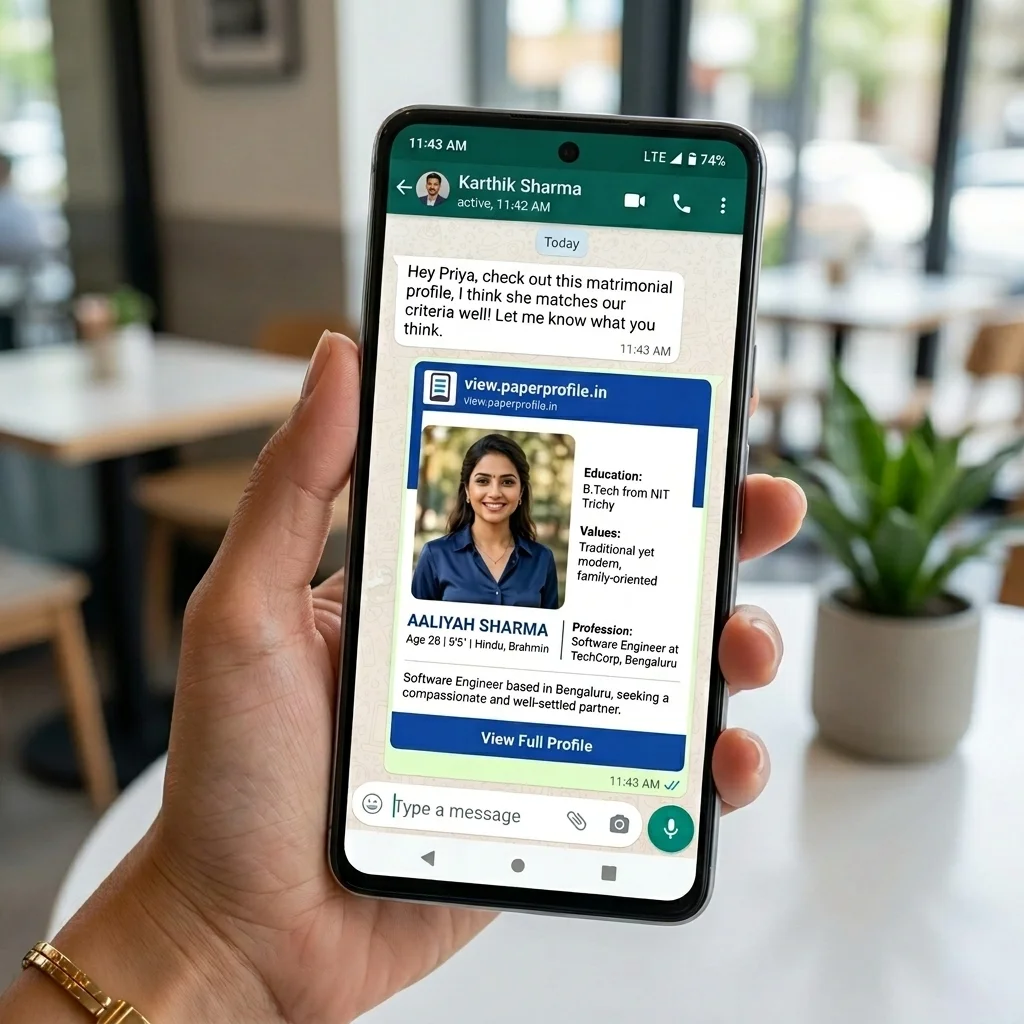
Create one marriage profile link that includes your biodata, photos, horoscope, and family details. Share it on WhatsApp instead of sending multiple PDF and image files to relatives, parents, and marriage brokers.
Perfect for
3,000+
Marriage profiles shared
5,000+
Family profile views
100+
Cities reached
Family profile sharing
online · biodata link on WhatsApp
Real family moment
This is what repeated biodata sharing sounds like
Relative
Can you send the latest biodata on WhatsApp?
10:18
Parent
I sent the PDF last week.
10:21 ✓✓
Relative
Photos and horoscope are missing.
10:24
Parent
Wait, I will find everything and send again.
10:27 ✓✓
Better: send one profile link where biodata, photos, and horoscope open together.
The actual problem: WhatsApp is a good sharing channel, but it becomes messy when it has to store every PDF, photo, update, and horoscope file.
Create one linkThe guide
The easiest way to send biodata on WhatsApp
The cleanest workflow is not to make another PDF. Create one online marriage profile, add the details families expect, then share the profile link in WhatsApp. The message stays short, the profile opens cleanly on mobile, and future edits stay connected to the same link.
“Can you send everything again?” becomes “Here is the profile link.”
Quick check
What do you usually send when someone asks for biodata?
Select the sharing habit that feels closest to your family workflow.
Select all
Select one or more situations that feel familiar.
A private profile link keeps the latest biodata available without resending files.
Real family scenario
Families usually do not send one file
A relative asks for the biodata on WhatsApp. Someone sends the PDF. Ten minutes later, the family asks for photos. Then horoscope. A week later the job detail changes, and the family starts the whole sharing process again.
Biodata PDF
Photos
Horoscope
Job update
New PDF
Corrected PDF
Final PDF
Final final PDF
One link. Everything updated.
Why PDFs fail on WhatsApp
Marriage biodata is more than one attachment
A complete marriage profile usually includes biodata details, photos, family background, and horoscope information. When each part is sent separately, the receiving family has to assemble the proposal from chat history.
Old biodata versions keep circulating
A PDF sent last month still looks official even after you update job, location, salary, or family details.
Photos and horoscope get separated
Families often receive biodata first, then ask again for photos, jathagam, birth chart, or extra details.
Parents repeat the same work
Every new WhatsApp request makes someone search chats, downloads, gallery folders, and older forwards.
Forwarded files reduce privacy control
Personal numbers, photos, and family details can move through broker groups without a clear owner.
A better workflow
Create the profile once, share it many times
Current WhatsApp way
✕ Create PDF
✕ Attach photos
✕ Send horoscope separately
✕ Resend latest version
PaperProfile way
✓ Create marriage profile
✓ Add photos and horoscope
✓ Share one private link
✓ Update anytime
PDF vs profile link
Marriage biodata PDF vs WhatsApp profile link
If someone searches for a marriage biodata PDF, what they usually need is a proposal that is easy to send, review, update, and forward safely.
Before you share
Questions families ask before sending biodata on WhatsApp
Is it safe to send marriage biodata on WhatsApp?
WhatsApp is fine as the sharing channel, but loose files are hard to control after forwarding. A private profile link keeps biodata, photos, horoscope, and family details in one place and gives the family a cleaner way to share.
What if I change my job, city, salary, or photo later?
With a PDF, every update creates another file. With a profile link, you edit the profile once and the same shared link opens with the latest details.
Can parents or relatives open it without installing an app?
Yes. A PaperProfile link opens in a normal mobile browser. Parents, relatives, and marriage brokers can tap the link from WhatsApp without downloading an app.
Can horoscope and photos be sent with the biodata?
Yes. Add photos and horoscope details to the profile before sharing. The receiving family sees the complete marriage proposal instead of asking for attachments one by one.
How to do it
How to share your biodata as a WhatsApp link
Create one marriage profile
Add biodata details, photos, family background, and horoscope details in one mobile-friendly profile.
Copy your private profile link
PaperProfile gives you a shareable biodata link that opens in any phone browser without an app download.
Send the link on WhatsApp
Paste one link in family chats, broker chats, or WhatsApp groups. The same link can be reused.
Update the profile anytime
When details change, edit the profile once. Families opening the link see the updated information.
Common mistakes
What to avoid when sharing a marriage proposal on WhatsApp
Sending the PDF before photos and horoscope
The receiving family may pause the conversation because the proposal feels incomplete.
Forwarding old versions after an update
A job change, city change, or new photo should not create a new file trail across relatives.
Putting every contact detail inside a forwarded file
Personal details need more care when a biodata can move through family groups and broker chats.
What to include
Build a profile families can review without follow-up
For WhatsApp sharing, your profile should answer the first set of questions a family usually asks before they request a call.
✓ Basic details: age, height, education, occupation, location
✓ Family details: parents, siblings, native place, community notes
✓ Photos: recent profile photos that do not get buried as loose images
✓ Horoscope: birth details, rasi, nakshatra, dosham, or chart image
✓ Contact preferences: how families should continue the conversation
Create profile target
Give every WhatsApp conversation one clear profile link.
Create your PaperProfile once. Share biodata, photos, horoscope, and updates from the same private link.
Create your marriage profile linkWhatsApp preview
What families receive instead of multiple files
A short WhatsApp message with one link is easier to forward, easier to open, and easier to keep current.
❌ Traditional Sharing
Sent separately to every family
✅ With PaperProfile
One simple, beautiful, private link that fits inside any chat.
📱 WhatsApp Share Preview
Shared Matrimony Profile
Online

Meenakshi Sundaram | PaperProfile
Meenakshi Sundaram · 27 yrs · Chennai, Tamil Nadu · Software Engineer
"Please find the profile and jathagam details."
Name: Meenakshi Sundaram
DOB: March 1999
Horoscope: Libra, Chitra
Dosham: Rahu Ketu Dosham, Kala Sarpa Dosham
Community: Hindu - Brahmin · Iyer
View Profile:
https://view.paperprofile.in/bride/27718256/meenakshi-sundaram
Profile ID: PP27718256
Quick answers
Questions about sharing biodata on WhatsApp
How do I share marriage biodata on WhatsApp?
Create an online marriage profile, copy the private profile link, and paste it into any WhatsApp chat. The receiving family can open biodata, photos, and horoscope details from one link.
Can I send a marriage biodata without PDF?
Yes. Instead of exporting a PDF, create a digital biodata link that opens in the browser. It works well for WhatsApp because families do not need to download or search for files.
How do I send photos with biodata on WhatsApp?
Add photos to your PaperProfile gallery and share the profile link. The receiving family sees photos with biodata and family details instead of receiving loose image messages.
Is a biodata link better than a PDF on WhatsApp?
Yes. A biodata link is easier to open on mobile, easier to update, and keeps photos and horoscope details together. PDFs become outdated once forwarded.
Can parents share the same profile link?
Yes. Parents can save the link and share it whenever relatives, brokers, or matching families ask for the profile.
Can I update my biodata after sharing it?
Yes. Edit your PaperProfile once and the same link shows updated details. You do not need to send a new PDF every time.
Can I include horoscope with my biodata link?
Yes. You can add horoscope details and upload a birth chart or jathagam image so families do not need a separate file.
Do people need an app to open the marriage profile?
No. The profile link opens in the browser on any phone. The recipient does not need to install PaperProfile.
Will WhatsApp compress my biodata photos?
If you send photos as loose WhatsApp images, they may be compressed or separated from the proposal. A profile link keeps photos connected to the biodata instead of treating them as separate chat attachments.
Can I hide my phone number while sharing biodata?
Yes. A private marriage profile gives you more control than a forwarded PDF. You can share key biodata details without putting every contact detail into a file that can be forwarded widely.
Continue your journey
Move from creating your profile to sharing it safely
These pages connect the full PaperProfile workflow: create the profile, share it on WhatsApp, keep it updated, and learn from real family stories.
Ready to share cleanly?
Create your marriage profile and send one link on WhatsApp.
Free to create. Ready in 5 minutes. Built for biodata, photos, horoscope, and family sharing.
Create your marriage profile link