How to Share Your Bharat Matrimony Profile with Family and Relatives
Learn how to share your Bharat Matrimony profile on WhatsApp, with relatives, parents, brokers, and family groups. Compare profile links, screenshots, and PDFs — and why a single marriage profile link works better.
TL;DR — Key Takeaways
- ✓Creating a Bharat Matrimony profile is only step one — sharing it with relatives is the harder part.
- ✓Most profile sharing happens outside Bharat Matrimony, on WhatsApp.
- ✓Families end up sending separate files: biodata, photos, horoscope, family details.
- ✓A single profile link is easier to share, update, and manage than multiple files.
- ✓PaperProfile lets you create one private link that contains everything in one place.
After creating a profile on Bharat Matrimony, the next challenge is sharing it with family members, relatives, brokers, and WhatsApp groups. Most families eventually move outside the matrimony platform and begin sharing details through WhatsApp.
The Real Problem Starts After Creating Your Bharat Matrimony Profile
Creating a Bharat Matrimony profile is only the first step. Once relatives become involved, families start forwarding screenshots, photos, PDFs, horoscope files, and profile links across WhatsApp groups. Very quickly, multiple versions of the same profile begin circulating.
- Relatives ask for the latest biodata
- Photos are shared separately
- Horoscope files get lost in chat
- Old profile versions continue circulating
- Families repeatedly ask for updates
How Bharat Matrimony Profiles Actually Spread
After a profile is created on Bharat Matrimony, the search for a match rarely stays inside the platform. Parents often forward details to close relatives. Relatives share them with their own networks. Marriage brokers may receive the profile and circulate it further.
Interested families then request additional information such as photographs, family details, or horoscope information. As the profile moves through different WhatsApp conversations, managing multiple files becomes increasingly difficult.
Profile Created
The profile is created or updated on Bharat Matrimony.
Parents Review
Parents check photos, education, work details, and family background.
Relatives Review
Close relatives receive the profile and share opinions.
WhatsApp Groups
The profile reaches family groups and extended networks.
Broker Receives It
A marriage broker may forward the profile to additional families.
More Details Requested
Interested families ask for photos, family details, or horoscope information.
Who Do Families Share Matrimony Profiles With?
- Parents and close family
- Relatives across WhatsApp groups
- Marriage brokers and agents
- Community elders and matchmakers
- Family friends
- Potential bride or groom families
Most profile sharing happens outside Bharat Matrimony. WhatsApp becomes the primary communication channel for discussions, recommendations, and forwarding.
What Usually Happens After You Share a Profile
Create Profile
Profile is created on Bharat Matrimony.
Send to Parents
Parents start reviewing and forwarding to relatives.
Forward to Relatives
Profile reaches family WhatsApp groups.
More Information Requested
Photos, horoscope, and family details get requested separately.
Multiple Versions Exist
Old screenshots and PDFs continue circulating — nobody has the latest.
Why Families Share Bharat Matrimony Profiles Outside the Platform
Even after creating a profile on Bharat Matrimony, many families continue sharing profiles manually. Relatives help identify matches, parents seek opinions from family members, brokers introduce profiles to additional families, and WhatsApp is faster than asking everyone to join a matrimony platform.
- Share the Bharat Matrimony profile link
- Send profile screenshots on WhatsApp
- Create a PDF biodata and forward it
- Use a dedicated marriage profile link (all-in-one)
How Parents Usually Share Bharat Matrimony Profiles
Most parents prefer WhatsApp because it is familiar and easy to use. When a new inquiry arrives, they usually forward whatever profile material they already have saved on their phone.
- Profile screenshots
- Biodata documents
- Recent photographs
- Family background details
- Horoscope information, if requested
Many parents maintain separate copies of these files so they can send them quickly. The problem is that once photos, job details, or location information changes, those saved copies may no longer be accurate.
Method 1: Share Your Bharat Matrimony Profile Link
The easiest option is using the built-in share functionality inside Bharat Matrimony. Open your profile, copy the profile link, and send it through WhatsApp. The receiver must be logged in to Bharat Matrimony to view the full profile.
How to Share Your Bharat Matrimony Profile on WhatsApp
Open Bharat Matrimony
Log in to your Bharat Matrimony account and open your profile.
Find Share Option
Look for the Share Profile option available on your profile page.
Copy Profile Link
Copy the generated profile URL.
Paste into WhatsApp
Send the link to relatives, parents, brokers, or family groups.
Limitations of Sharing a Bharat Matrimony Profile Directly
- Recipients may need a Bharat Matrimony account to view the full profile
- Relatives often request separate photos
- Horoscope is usually shared as a separate file
- Profile information can become outdated quickly
- Families still end up forwarding screenshots regardless
Common Messages Families Receive
- "Can you send the latest photo?"
- "Do you have a biodata copy?"
- "Please share horoscope."
- "Can you send family details?"
- "Is this the latest version?"
- "Can you resend the profile?"
These messages are common because the profile, photos, biodata, and horoscope often live in different places. A relative may have one screenshot, a parent may have another PDF, and a broker may be forwarding an older version.
Method 2: Share Screenshots
Many families share screenshots of photos, education details, and family information. While convenient, screenshots become difficult to manage when profiles are forwarded repeatedly — quality degrades and recipients lose context.
How Marriage Brokers Handle Shared Profiles
Many brokers receive dozens of profiles every week. For this reason, they generally prefer formats that are easy to open, easy to forward, and complete enough for another family to review without asking for many follow-up files.
- Easy-to-open links
- Single-file biodata
- WhatsApp-friendly formats
- Clear photos and family details
- Updated information that can be forwarded confidently
The simpler a profile is to forward, the easier it becomes for brokers to introduce it to additional families. For a deeper broker-specific guide, read how to share a marriage profile with brokers.
Method 3: Share a PDF Biodata
Some families create a separate marriage biodata PDF and share it alongside horoscope and photos. Relatives end up receiving multiple files in a single message.
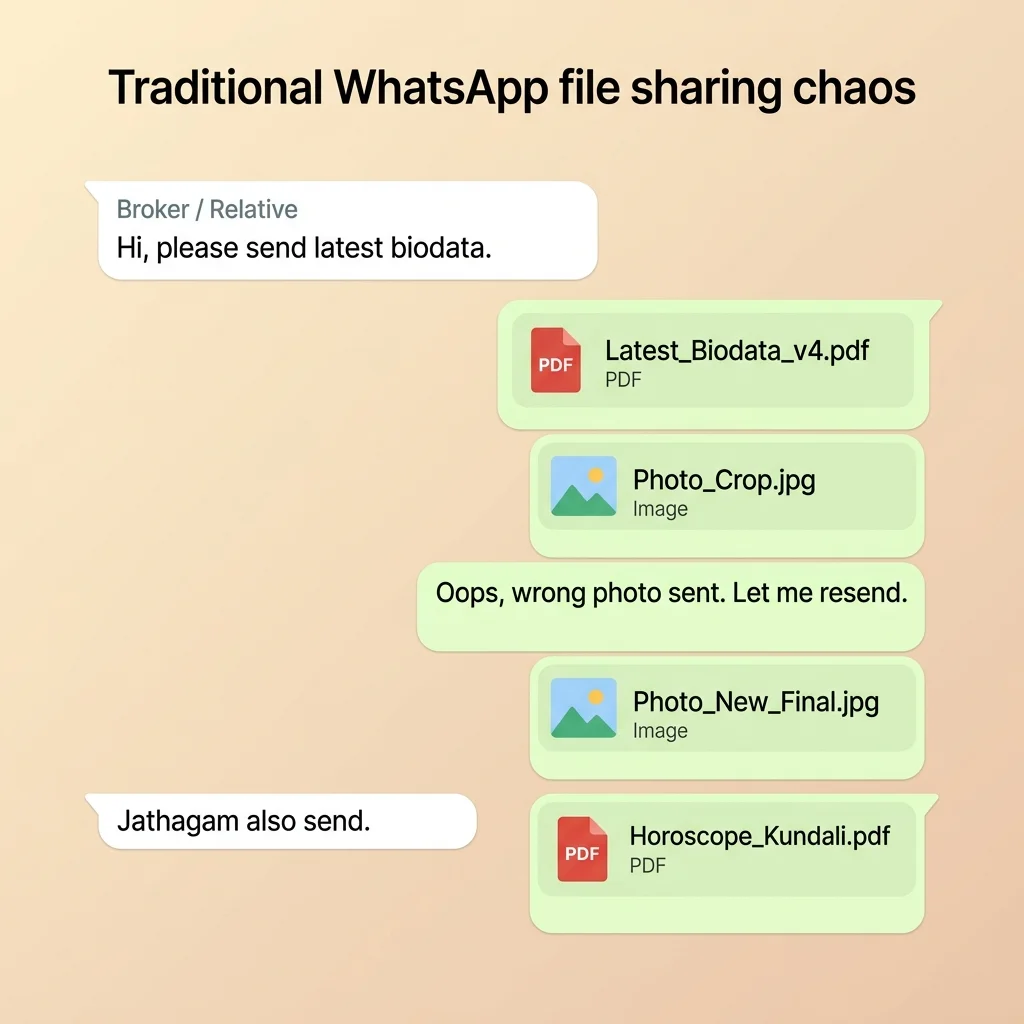
The challenge with PDFs is version management. Once the biodata changes, families must resend everything again — and old versions keep circulating.
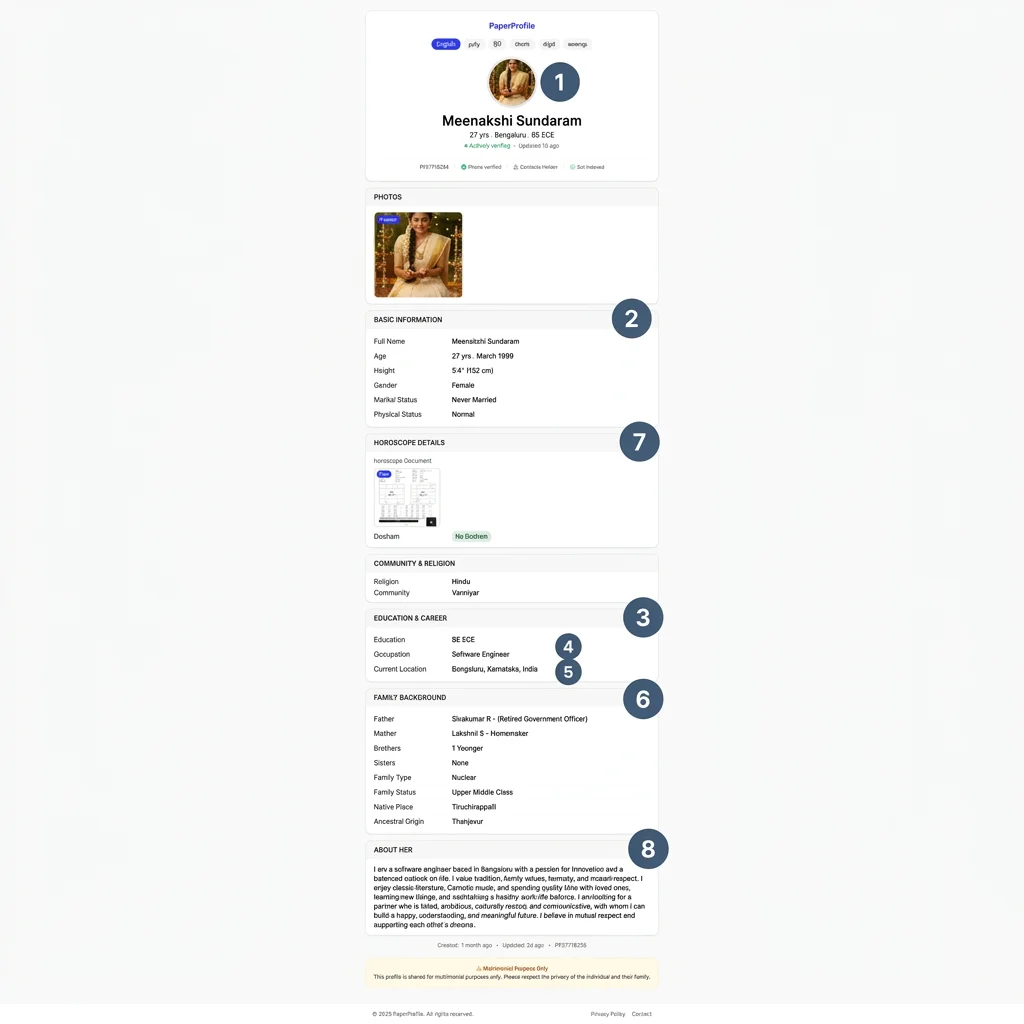
Why Many Families Create a Separate Sharing Profile
Many families continue using Bharat Matrimony for searching and matching, but create a separate shareable profile for relatives, brokers, and WhatsApp groups. This keeps photos, biodata, family details, and horoscope together in one place.
A Simpler Way to Share Your Matrimony Profile
Instead of sending profile screenshots, PDF biodata, horoscope files, and photos separately, many families now use a single marriage profile link that contains everything in one place.
- One link instead of multiple files
- Photos stay high quality
- Horoscope included
- Update details anytime — no resending needed
- Works perfectly on WhatsApp
- Private — only people with the link can view
Why Profile Sharing Becomes Hard Over Time
As marriage discussions continue, profile information often changes. New photos are added, employment details may change, location information may be updated, and families may request additional documents.
When these details are spread across multiple WhatsApp chats and files, maintaining consistency becomes difficult. This is why many families eventually prefer one updated profile link instead of separate screenshots, PDFs, photos, and horoscope files.
Profile Link vs PDF Biodata vs Screenshots
| Factor | Profile Link | PDF Biodata | Screenshot |
|---|---|---|---|
| Easy to update | Yes | No | No |
| Easy for parents | Yes | Yes | Yes |
| Easy for brokers | Yes | Moderate | Moderate |
| Forwarding quality | Yes | Moderate | No |
| Shows latest information | Yes | No | No |
Still sharing your biodata the old way?
Create a secure PaperProfile link. Keep your contact details private and update anytime.
Written By
PaperProfile Team
We study how Indian families share marriage profiles, biodata, photos, and horoscope information on WhatsApp.
PaperProfile helps Indian families create secure, private marriage profiles and share them as single links on WhatsApp. We eliminate version confusion, attachments size issues, and forwarded PDF files.
Frequently Asked Questions
Can I share my Bharat Matrimony profile on WhatsApp?+
Yes. Bharat Matrimony allows profile sharing through profile links that can be sent via WhatsApp. However, the receiver must be logged into Bharat Matrimony to view the full details.
How do I send my Bharat Matrimony profile to relatives?+
The easiest way is by sharing your profile link through WhatsApp. Some families also use screenshots or PDF biodata files, but those are harder to update.
Can I share my Bharat Matrimony profile with brokers?+
Yes. Most brokers prefer a simple profile link or biodata they can forward to prospective families. A dedicated marriage profile link works best because it includes photos, horoscope, and details in one place.
How do parents usually share matrimony profiles?+
Most parents use WhatsApp groups, relatives, community contacts, and brokers to circulate profiles. Typically this involves forwarding screenshots, PDFs, and photos separately.
What is better than sending multiple biodata files?+
A single profile link is easier to manage because photos, biodata, and horoscope remain in one place. When anything changes, you update once and the link always shows the latest version.
Should I send screenshots or a profile link?+
Profile links are easier to update and manage compared to screenshots. Screenshots lose quality when forwarded repeatedly and become outdated quickly.
Do families still use PDF biodata?+
Yes. However, many families are moving toward shareable profile links because updates become easier and everything stays in one place.
Can people view my Bharat Matrimony profile without an account?+
Depending on privacy settings and membership restrictions, some profile details may require a Bharat Matrimony account to view. Many families therefore share screenshots, PDFs, or dedicated profile links when sending profiles to relatives.
📖 Suggested Reading
How to Send Your Matrimony Profile to Relatives on WhatsApp
A practical guide for sending your marriage profile to relatives, parents, aunts, uncles, and family friends through WhatsApp without the confusion of multiple files.
How to Share Your Marriage Profile with Brokers and Agents
Learn how to share your marriage profile with marriage brokers, agents, and matchmakers in a way that is easy to forward and always up to date.
Why PDFs Are Bad for Marriage Biodata
Sending biodata as a PDF file causes privacy leaks, outdated information, and zero control. Here's why families are switching to digital profiles.
How Parents Share Marriage Profiles Today — WhatsApp, Relatives, and Brokers
How Indian parents actually share their child's marriage profile today — through WhatsApp groups, relatives, community contacts, and marriage brokers.
The Best Way to Share Marriage Biodata on WhatsApp
Most families send biodata as separate files on WhatsApp — a biodata file, loose photos, and a photo of their printed paper horoscope chart. A biodata link replaces all of that with one private, always-up-to-date URL families open instantly on their phones.
Create your marriage profile in 5 minutes
Stop forwarding your biodata, photos, and horoscope separately. Share one secure link instead.
No credit card required. Free to start.