The Best Way to Send Marriage Biodata Without a PDF
Sharing a marriage biodata as a PDF is the default — but it has real problems. Here is the better approach: a private online profile that shares as a link, not a file.
❌ Most families still send:
✨ There is a simpler way:
Open instantly on any phone with full resolution photos, horoscope, and details in one place.
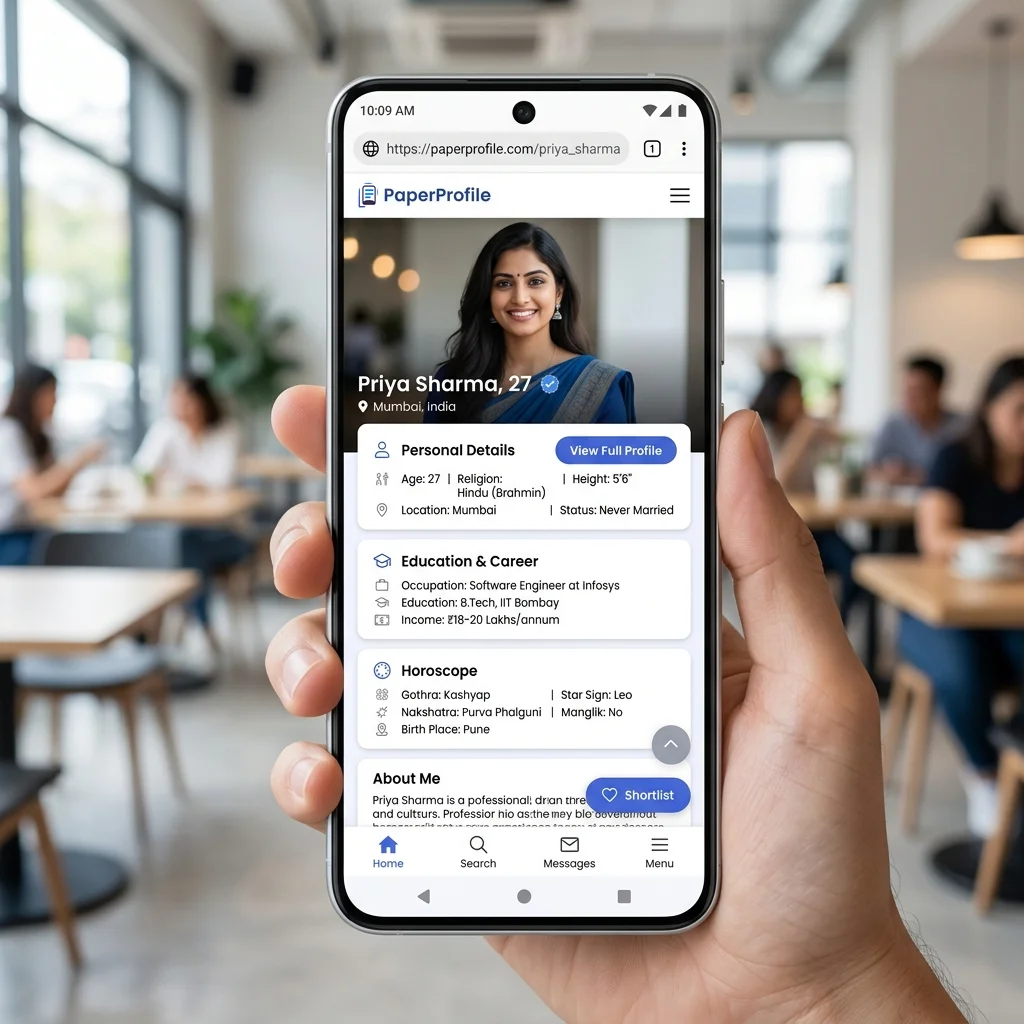
Tapping a single link opens the complete profile instantly in a mobile browser.
TL;DR — Key Takeaways
- ✓Sending biodata as files leads to file clutter, blurry compressed photos, and version issues.
- ✓Sharing a link loads media directly from cloud servers at full resolution.
- ✓You can edit your biodata details in one place; all existing links update dynamically.
- ✓Deleting your profile immediately stops access for everyone who had the link.
- ✓A single private online profile link keeps your photos, horoscope, and details synchronized and private.
Most families send marriage biodata as multiple files on WhatsApp: PDF biodata, photo attachments, and a horoscope separately. This creates mess, privacy risk, and constant re-sending. Here is a single better approach.
Key Takeaway
A PDF is a static document. Once sent, you surrender control of it. Switching to a private online profile link solves photo compression, outdated versions, and privacy risks in one go.
Why Families Still Use PDFs (And How We Got Here)
For nearly three decades, the Word document and the exported PDF have been the default medium for matrimonial proposals. To understand why, we have to look back at the early days of matrimonial searches. Originally, families met in person, carrying physical bundles of paper biodatas and printed photographs. When the search moved online in the early 2000s, Microsoft Word became the only accessible layout tool. Families simply typed out their details, printed the page, or sent it as an email attachment.
When smartphones and WhatsApp became the primary channels for family communication in India, the PDF file became the default replacement. It was easy to attach, did not require special software to open, and preserved the layout across different computers. More recently, online design templates allowed families to add colorful backgrounds, floral borders, and styled frames to their biodatas. However, while the design became more colorful, the format remained exactly the same: a static A4-sized document designed for printing on paper, not for interactive viewing on a 6-inch mobile screen.
Printed Biodata
1990s - Hand-delivered A4 folders
Word Document
2000s - Typed & emailed attachments
Formatted PDF
2010s - WhatsApp files with layouts
Profile Link
Today - Secure live-updating links
The problem is not that families want to send bad files. The problem is that the way we share has moved entirely to mobile chats and instant messaging, while the document format we use has remained stuck in the desktop era. Matrimonial consultants and community coordinators note that continuing to use desktop document formats for mobile-first messaging is the root cause of the presentation chaos families experience today.
What Actually Happens During Marriage Search (The Forwarding Loop)
Matrimonial searches are a collaborative family process. When a parent or mediator receives a proposal, they rarely keep it to themselves. They forward it to key decision-makers: uncles, aunts, trusted cousins, astrologers, and local marriage brokers. This forwarding loop quickly gets out of hand. A single PDF file sent to a relative in Chennai gets forwarded to a cousin in Bangalore, who passes it to a local broker, who then forwards it to three different WhatsApp groups containing hundreds of other families. To learn how to share secure links over chat instead of loose files, read our guide on How to Send Marriage Biodata on WhatsApp.
This uncontrolled distribution creates major coordination issues. In a traditional matrimonial search, a family is forced to manage multiple separate documents. A typical proposal consists of a PDF biodata, three or four loose image attachments, and a photo of the printed paper horoscope (jadhagam/patrika) taken on a phone. Parents often go to a local horoscope shop to create a paper copy of the chart, snap a photo of it, and forward that image separately. Because these are sent as separate files, they regularly get detached from one another in long chat histories, forcing families to ask, "Which horoscope belongs to which candidate?" or "Where are the photos for the groom profile we liked yesterday?"
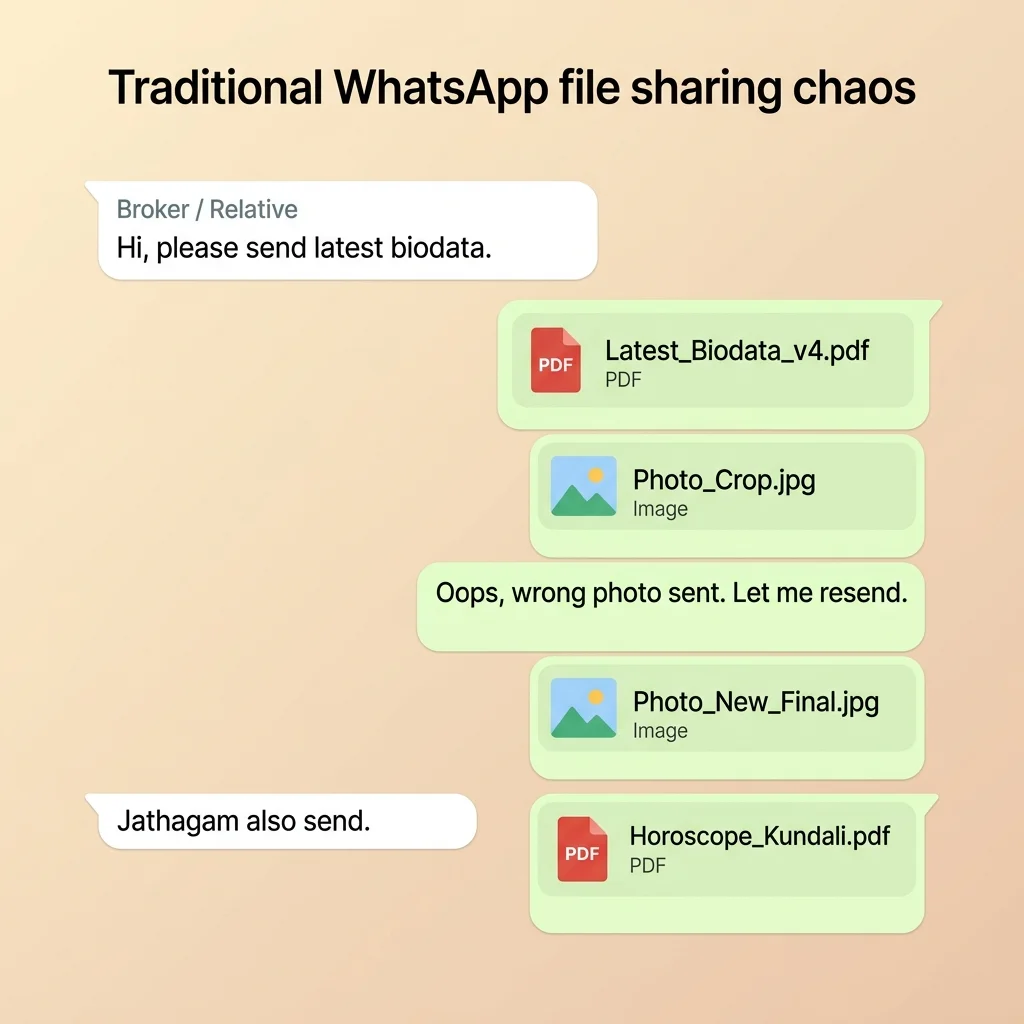
What Actually Happens in a Matrimonial Household
"Did you share the latest biodata with Meera Aunt?"
"Yes, but I had to send the photo of the paper horoscope chart from the jadhagam shop separately because the template didn't have a space for it."
"The photo of the horoscope is too blurry to read, and the main photo in the biodata is highly pixelated. Can you send fresh files on WhatsApp?"
"Now we have to find the raw photos, resend them, and explain which horoscope photo matches. This is so confusing!"
Real Problems Caused By PDF Matrimonial Sharing
When someone asks for your biodata, the natural instinct is to open a Word template or a layout editor, fill in the details, export a PDF, and send it on WhatsApp. Every family does this. And every family runs into the same problems: photos get blurry, files get forwarded without your consent, updates are a nightmare, and horoscopes get detached in chat history. For a detailed breakdown of these file vulnerabilities, check out our guide on Why PDFs Are Bad for Marriage Biodata.
1. Outdated Biodata
Matrimonial searches often last months. If you switch jobs or change your salary range, you cannot recall old PDF copies stored locally on dozens of recipient phones.
2. Blurry Photos
WhatsApp compresses document attachments and embedded images aggressively, leaving candidate photos blurry or pixelated for families.
3. No Forwarding Control
Once sent, you lose ownership of the document. Strangers can forward your photos, phone number, and ancestral details to unauthorized groups.
4. Loose Files Clutter
Horoscope sheets and photo attachments get detached from the main biodata text inside chat archives, causing match checking delays.
5. Zero Analytics
You enter a complete communication black box. You have no way of knowing whether the other family opened or read your proposal.
The better approach: share a marriage profile link
The solution is not a smarter PDF. It is a fundamentally different format. Instead of a file, you share a private biodata link. The link opens a structured profile page — your name, photo, family details, education, occupation, horoscope — all in an organised web page that displays correctly on any phone. To understand the technology behind this shift, see our detailed guide on What is Digital Biodata.
The key difference: the profile lives online, not in a file. That changes everything about how sharing works. By storing details on a secure server, you retain ownership of your data and can control access dynamically.
PDF vs. Profile Link: Side-by-Side Comparison
To see how layout and technology affect how your details are shared and received, the table below outlines the core functional differences between a static PDF document and a private web profile link:
| Feature | Traditional PDF / Word File | Private Web Profile Link |
|---|---|---|
| Update after sending | ❌ No. Must export and manually resend the file to all contacts. | ✅ Yes. Updates instantly sync across all previously shared links. |
| WhatsApp sharing layout | ⚠️ Generic file icon. No visual preview in chat. | ✅ Clean text message containing key qualifications and profile link. |
| Multiple photos | ⚠️ Compresses heavily. Quality degrades on forwarding. | ✅ Loads full-resolution photos directly in browser. |
| Horoscope integration | ✗ Sent separately as a phone photo of the paper horoscope. Gets detached. | ✅ Integrated chart built directly inside the same profile link. |
| Control contact details | ❌ Exposed permanently to anyone who receives the document. | ✅ Contact number hidden by default from the public profile page. |
| Revoke sharing | ❌ Impossible. Once forwarded, files are saved locally. | ✅ Yes. Deleting the profile instantly stops access for all. |
| Mobile friendliness | ⚠️ Pinch, zoom, and pan required to read A4 sheets on phone. | ✅ Fully responsive mobile layout designed for 1-screen scan. |
| Tracking & Feedback | ❌ Blind sharing. No way to know if document was opened. | ✅ View analytics tell you when a family views your profile. |
What Families Actually Need (And Why the Container Matters)
When we look closely at matrimonial introductions, we realize that families are not actually looking for a PDF or a Word document. Nobody enjoys downloading and managing files on their device. What they actually want is access to key bits of information in a secure, readable format:
- ✅ Photo: To form the crucial first impression.
- ✅ Basic details: Age, height, and location for initial compatibility checking.
- ✅ Education: Educational qualification and college credentials.
- ✅ Family details: Parental occupations, native roots, and sibling status.
- ✅ Horoscope: Nakshatra, Rasi, and Dosham matching parameters.
- ✅ Contact information: A safe method of communication to schedule call requests.
The PDF is simply a container used to ship this information. But it is an inefficient container: it leaks privacy, compresses photos, and goes out of date instantly. A private web profile link is a modern container for the exact same information. It packages your details in a secure, mobile-responsive layout that updates live and allows you to mask contact info. You are not changing your biodata details — you are simply upgrading the container to respect your privacy and make it easy for other families to read.
Case Study: The Chennai Family's Relocation Crisis
Consider the case of Priya, a software engineer originally from Chennai. In late 2024, she was based in Chennai, and her father prepared a standard PDF biodata listing her location, current role, and an annual CTC of ₹12 LPA. Her father shared the PDF file with relatives, two local brokers, and three community WhatsApp groups containing hundreds of active families.
In late 2025, Priya secured a new role at a product startup in Bangalore with an updated compensation package of ₹22 LPA. Her father edited the details, generated a new PDF, and sent it to their brokers. However, in mid-2026, a highly compatible Bangalore-based family rejected their proposal because they were looking at the older 2024 PDF. That version had been forwarded multiple times across relatives and still listed her in Chennai at her old salary. Her father had no way to delete or recall the older copies circulating in the WhatsApp network.
After realizing the version mismatch, the family switched to a live profile link. They registered her details, uploaded her photos and horoscope, and generated a private URL. When Priya received a promotion a few months later, her father updated the details in their central dashboard. The exact same link instantly displayed her Bangalore location and updated CTC to every family, relative, and broker holding the link, eliminating version mismatch entirely and securing a successful match shortly after.
When Using a PDF Is Still Okay
While digital links offer superior security and presentation quality on mobile devices, traditional PDF documents still have a place in specific matrimonial contexts. It is important to maintain a balanced approach and keep a clean PDF version ready as a fallback option.
PDF files remain useful when meeting elderly relatives in person who prefer reading printed paper folders, or when submitting details to bulk community bio registries and marriage bureaus that store physical records. If you are preparing a traditional document layout for these fallback scenarios, consult our Best Biodata Format for Marriage guide to ensure your sections match family expectations.
However, for your primary digital sharing — especially when sending proposals person-to-person on WhatsApp or email — the private web profile link should be your default choice to protect your photos and maintain version control.
Common Questions Families Ask About Link Sharing
Can relatives see my contact details on the link?
No. A major benefit of using a digital profile link is the ability to hide sensitive contact details. When a relative or broker opens the link, they see your photos, education, and family background, but your verified phone number is hidden from the public profile by default to protect your privacy. Only the people you communicate with directly on chat will know your number, keeping you in control.
Can I hide my photos or horoscope chart?
Yes. You can delete your profile at any time from your dashboard. Once deleted, the link will no longer load, instantly preventing anyone from viewing your photos or horoscope chart.
Can I update my details after sharing the link?
Yes. Because the profile is hosted on a secure web server, any change you make in your dashboard updates instantly. Anyone opening the link will see the latest details, eliminating the need to resend files.
Is my matrimonial profile public on search engines?
No. Matrimonial profile links generated through secure platforms like PaperProfile are configured with search engine blocking tags. They are private links and cannot be indexed by Google, Bing, or Yahoo, ensuring your personal details remain invisible to the public web.
The Ultimate Marriage Biodata Sharing Checklist
Before you share your marriage profile, make sure you have checked off the following elements to ensure a professional presentation and secure sharing. You can learn how to build one step-by-step by following How to Create a Marriage Profile:
- ✅ High-Resolution Portrait: A recent, well-lit portrait with a neutral background.
- ✅ Up-to-date Career Details: Specific designation, industry type, and current location.
- ✅ Complete Education Info: Degree, specialization, and college names.
- ✅ Structured Family Notes: Parents' occupations, native place, and sibling marital status.
- ✅ Accurate Horoscope Parameters: Gothra, Rasi, Nakshatra, and Dosham details.
- ✅ Privacy Controls Enabled: Contact details hidden by default from the public profile.
- ✅ Active Live Link: Verify that your URL opens cleanly on a mobile browser.
The Future of Matrimonial Sharing
Matrimonial sharing in India has undergone a significant evolution over the past few decades. In the 1995–2005 era, sharing meant physically printing biodatas on A4 sheets and exchanging them at family gatherings. In the 2005–2018 era, the desktop PDF and Word templates became the default, allowing documents to be sent as email attachments.
Today, we are in the mobile chat era. Sending static files that compromise your privacy, compress your photos, and circulate outdated information is no longer practical. The future of matrimonial sharing belongs to secure, private web profile links. They preserve media quality, sync updates live, and allow candidates to revoke access, returning ownership of personal data to the candidate.
Still sharing your biodata the old way?
Create a secure PaperProfile link. Keep your contact details private and update anytime.
Written By
PaperProfile Team
Marriage Profile Sharing Experts
PaperProfile helps Indian families create secure, private marriage profiles and share them as single links on WhatsApp. We eliminate version confusion, attachments size issues, and forwarded PDF files.
Frequently Asked Questions
Does sharing a link look unprofessional to traditional families?+
Not at all. In fact, receiving a clean, easy-to-read browser link is much more convenient for families on WhatsApp, and shows you are modern and organized.
Can I download a PDF from my link?+
No, PaperProfile is a secure link-based system. However, if a broker or relative strictly needs a document, you can open your private profile link in any mobile or desktop browser and use the browser's native print option to save it as a PDF or print it.
📖 Suggested Reading
The Best Way to Share Marriage Biodata on WhatsApp
Most families send biodata as separate files on WhatsApp — a biodata file, loose photos, and a photo of their printed paper horoscope chart. A biodata link replaces all of that with one private, always-up-to-date URL families open instantly on their phones.
Why PDFs Are Bad for Marriage Biodata
Sending biodata as a PDF file causes privacy leaks, outdated information, and zero control. Here's why families are switching to digital profiles.
What Is Digital Biodata for Marriage? (And How It Differs from a PDF)
A digital biodata is an online profile you share as a private link — not a PDF, not a Word file. It stays updated, loads photos clearly, and lets you control who sees your details.
Best Biodata Format for Marriage — Section Order, Content, and What Families Actually Read
The right section order is only half the problem. Most biodata fail because the content is too generic. This guide covers exactly what to write in each section — with real examples.
Create your marriage profile in 5 minutes
Stop forwarding your biodata, photos, and horoscope separately. Share one secure link instead.
No credit card required. Free to start.