How to Create a Marriage Profile That Actually Works
A complete guide to building a marriage profile that gets responses — what to include, what to avoid, and how to present it.
Key steps to create an effective profile:
- ✓High-quality portrait photography
- ✓Specific career & income details
- ✓Ancestral place & native family notes
- ✓Secure link sharing with privacy controls
❌ Most families still send:
✨ There is a simpler way:
Open instantly on any phone with full resolution photos, horoscope, and details in one place.
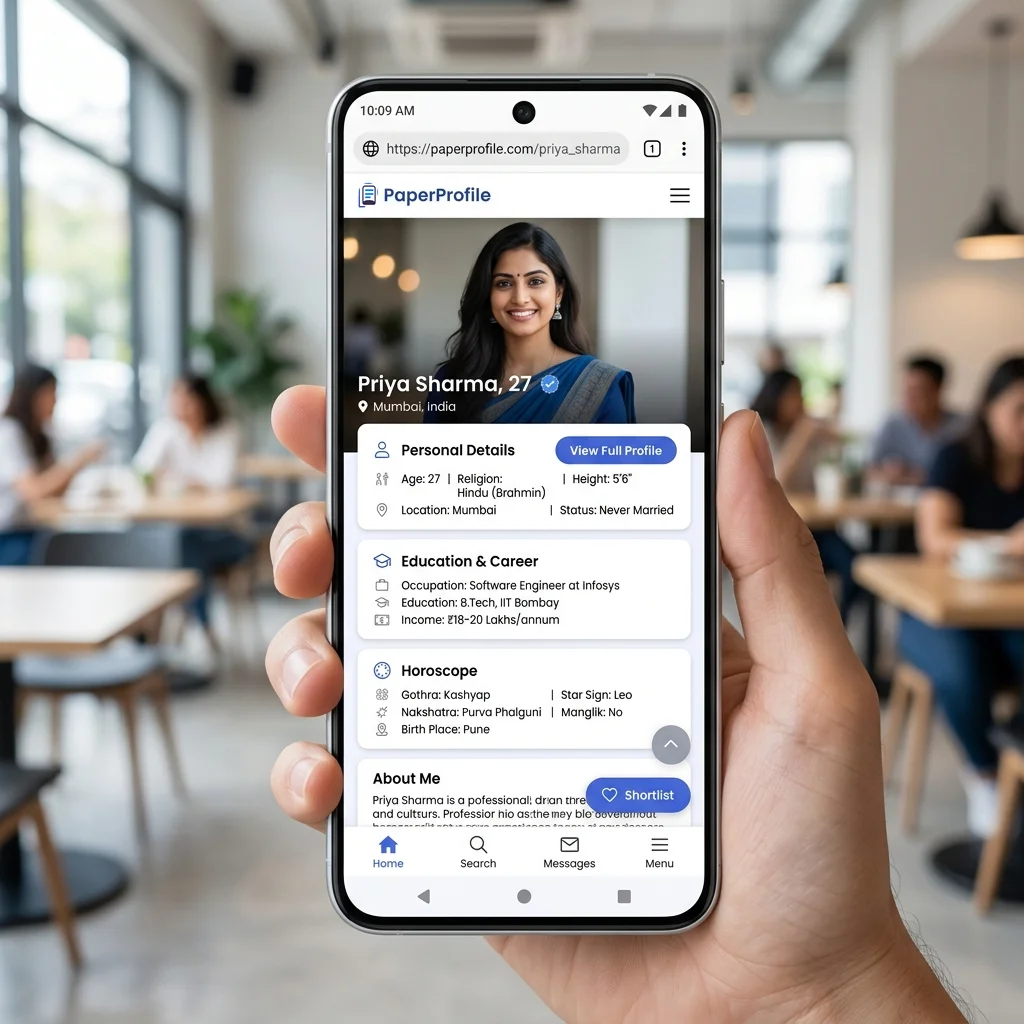
Filling out all sections completely increases match response rates significantly.
TL;DR — Key Takeaways
- ✓Always use clear, recent, unfiltered photographs for matrimonial profiles.
- ✓Fill out all sections (income, caste, horoscope) completely to build trust.
- ✓Be specific about your job description, organization, and native place.
- ✓Limit expectations to a few realistic and essential criteria sentences.
Most marriage biodata profiles are incomplete, outdated, or poorly presented — not because the candidate is a bad match, but because no one told them what actually matters to families on the other side. When families receive dozens of profiles daily, presentation and clarity become your primary differentiator.
A high-performing marriage profile needs to be structured in a scanning hierarchy. Families scan, filter, and decide whether to proceed in under 60 seconds. A professional presentation ensures your details get read, rather than skipped. For a detailed breakdown of formatting rules, check out our Best Biodata Format for Marriage guide.
Anatomy of a High-Performing Profile
Before writing your details, understand the layout families expect. Standardizing your layout makes it easy for parents and matchmakers to locate key details instantly: Photo ➔ Personal Details ➔ Education & Career ➔ Family Background ➔ Horoscope ➔ Expectations.
1. Photo: The First Impression
The photo is the first thing families look at. A blurry, dark, or years-old photo immediately reduces interest — not because of how you look, but because it signals a lack of care or transparency. Profiles with high-resolution photos receive significantly higher response rates.
Key Insight
✅ Best practice: Include 2–3 photos. Use a recent (taken in the last 6 months) portrait with soft, natural lighting. Dress in traditional or business casual attire. Avoid group pictures, heavy social media filters, sunglasses, or low-resolution crops.
2. Personal details: Scannable stats
Keep this section structured as clean bullet points rather than paragraphs. Families need to check basic compatibility statistics immediately without hunting through text.
- Full Name: Professional presentation, preferably with native family naming convention.
- Age & Height: Checked early for compatibility matching.
- Religion, Caste, Sub-Caste: Essential community markers for family compatibility.
- Mother Tongue: Defines regional background and cultural fit.
- Current City: Specifies current residence, which is critical for career alignment.
- Marital Status: Clear mention of "Never Married", "Divorced", or "Widowed".
3. Be specific about career and location
Modern families place significant weight on the candidate's education and career path. Vague career descriptions create doubt. Always specify the exact degree, institution name, and current role type. You can see how these details look in a finished template by reading our Marriage Biodata Examples.
"Working in IT company in Bangalore, earning well."”
Key Insight
✅ Specific & clear: "B.Tech in Computer Science from NIT Calicut (2020). Currently working as a Senior Software Engineer at a product startup in Bangalore. Income range: ₹15–18 LPA."
Still sharing your biodata the old way?
Create a secure PaperProfile link. Keep your contact details private and update anytime.
4. Family Background: The compatibility check
In the Indian arranged marriage context, family details are scrutinized closely. The family notes section should give a complete view of parents, siblings, and ancestral roots. Avoid generic statements like "caring family" and focus on specific details.
- Father's Name & Profession: Detail the specific business or job role (e.g. "Father: Retired Bank Manager, SBI" rather than just "Retired").
- Mother's Name & Profession: Detail whether working or homemaker.
- Siblings: List brothers and sisters with their education, current role, and marital status.
- Native & Ancestral Place: Essential for traditional compatibility checks.
- Family Values: Describe values (e.g., traditional, modern, close-knit) without using long paragraphs.
5. Expectations & Horoscope Details
Your partner preference section should be honest but welcoming. Keep it to 3–4 concise sentences covering preferred age range, educational background, location alignment, and career support. Avoid presenting a long list of rigid demands, which can discourage genuine families from starting a conversation.
For families who require horoscope matching, missing astrology details means the conversation cannot move forward. Include Rasi, Nakshatra, and whether any dosham is present (explicitly state "none" if not applicable).
Still sharing your biodata the old way?
Create a secure PaperProfile link. Keep your contact details private and update anytime.
Common Marriage Profile Mistakes (And How to Fix Them)
Our study of profile sharing shows that simple mistakes can lead to instant skips. The table below covers the most common errors.
| Common Mistake | How to Fix It |
|---|---|
| ❌ Filtered or Group Photos | Use a recent, high-resolution portrait in natural light with a neutral background. |
| ❌ Vague Job & Education | Specify the degree, college name, employer type (IT, startup, etc.), and job title. |
| ❌ Blank Horoscope Details | Provide Nakshatra, Rasi, and Dosham up front to avoid delays in matching. |
| ❌ Wall of Text Expectations | Keep preferences clear, positive, and limited to 3-4 key criteria sentences. |
Traditional sharing vs secure digital link
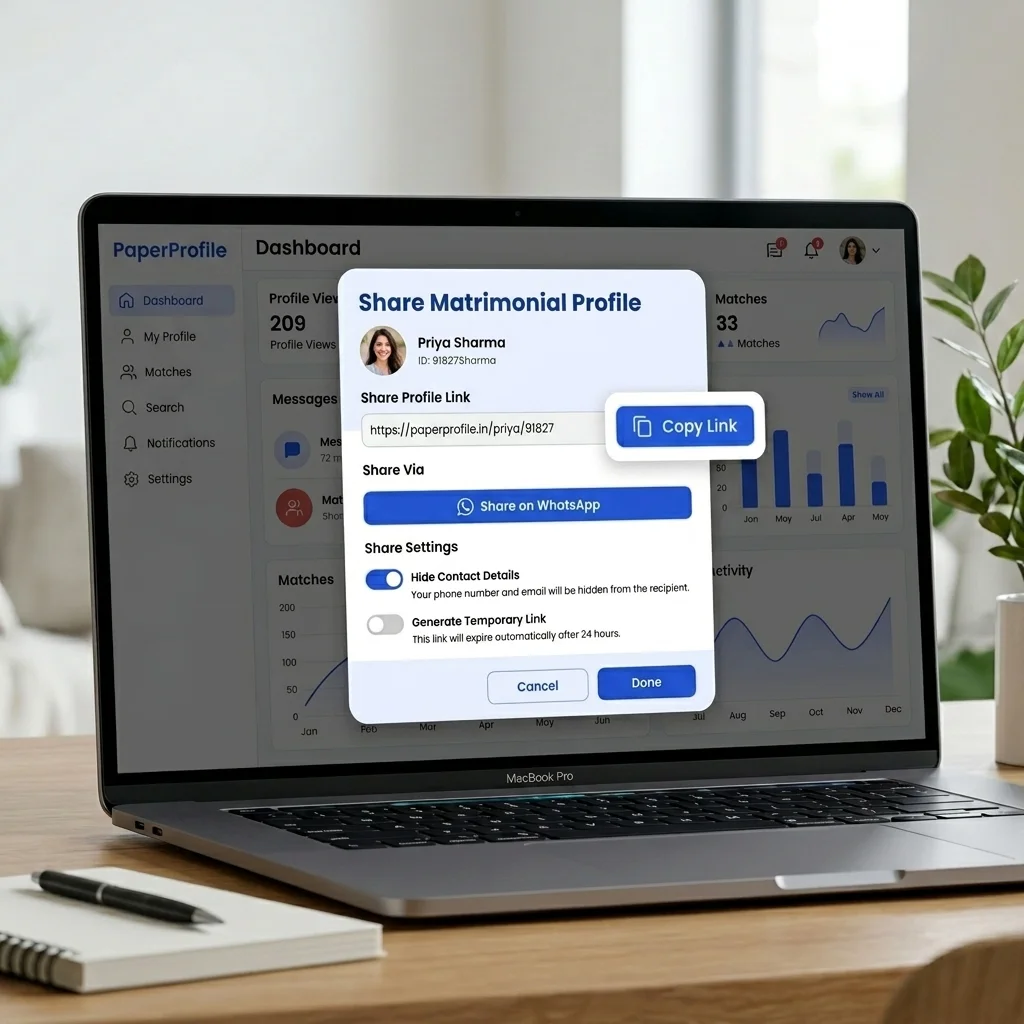
Once you send a static biodata file over WhatsApp, you lose control over who forwards it, who stores it, and who views your details. Your phone number is permanently exposed in the file. Read more on Why PDFs Are Bad for Marriage Biodata to understand these security concerns.
A digital marriage profile (like PaperProfile) solves this by hosting details under a private link. To understand this technology, see our guide on What is Digital Biodata. You retain full custody of your data: you can hide contact details and delete the profile at any time when a match is finalized. To learn how to share this link safely on WhatsApp, read our guide on How to Send Marriage Biodata on WhatsApp.
Matrimonial Profile Creation Checklist
Ensure your profile matches this complete checklist before sending it to prospective families:
- ✅ Recent, professional portrait: Well-lit, high resolution, plain background.
- ✅ Personal details: Name, age, height, current city, religion, caste, mother tongue.
- ✅ Clear education: Specific degree, major, university name, and graduation year.
- ✅ Explicit career status: Job role, employer name/industry type, work location, and career plans.
- ✅ Structured family notes: Parent professions, brother/sister details (occupations & marital status), and native place.
- ✅ Horoscope info: Nakshatra, Rasi, Lagnam, and Dosham (explicitly state "none" if not applicable).
- ✅ Privacy settings: Contact details hidden by default from the public profile.
Written By
PaperProfile Team
We study how Indian families share marriage profiles, biodata, photos, and horoscope information on WhatsApp.
PaperProfile helps Indian families create secure, private marriage profiles and share them as single links on WhatsApp. We eliminate version confusion, attachments size issues, and forwarded PDF files.
Frequently Asked Questions
How many photos should I add to my marriage profile?+
Adding 2–3 photos is ideal. Provide one close-up headshot, one full-length picture, and optionally a casual outdoor picture in good lighting.
Should I write my expectation list in bullet points?+
Keep it as a short paragraph. A long list of bulleted expectations can come across as demanding or inflexible.
How can I protect my privacy when sharing my marriage profile?+
Instead of sharing a static biodata file on WhatsApp, share your profile as a secure PaperProfile link. This allows you to hide your phone number and delete the profile whenever you wish.
📖 Suggested Reading
What Families Look for in a Marriage Biodata
From the family perspective — what information matters most when evaluating a matrimonial proposal, and what red flags to avoid.
Why PDFs Are Bad for Marriage Biodata
Sending biodata as a PDF file causes privacy leaks, outdated information, and zero control. Here's why families are switching to digital profiles.
Digital Biodata vs Traditional Biodata — A Complete Comparison
PDF and Word biodata have dominated Indian matchmaking for decades. Digital profiles are changing that. Here's a full comparison.
Create your marriage profile in 5 minutes
Stop forwarding your biodata, photos, and horoscope separately. Share one secure link instead.
No credit card required. Free to start.